Campaigns — Send Emails That Get Results
A campaign is an email you send to a group of people — a newsletter, a product announcement, a sale promotion, a re-engagement nudge. If you've ever used Mailchimp, ConvertKit, or any email tool, you already know what this is.
What makes Score CRM campaigns powerful:
- Target precisely — send to smart segments or uploaded lists, and exclude anyone you want
- Personalize everything — use merge tags to customize subject lines and content for each recipient
- Test before you commit — A/B test subject lines, content, or sender names, then automatically send the winner
- Send on your schedule — launch immediately, schedule for later, or throttle delivery over time
- Track everything — see opens, clicks, bounces, and engagement in real time
The Campaign Workflow
Here's the typical flow from idea to results:
- Create your campaign — set up the subject, sender, and content
- Choose your audience — pick which segments and lists to include or exclude
- Test — send yourself a test email to check everything looks right
- Launch — send immediately or schedule for the perfect time
- Monitor — watch real-time results as people open and click
What Happens After You Launch
Once a campaign is live, it moves through these stages:
| Status | What's happening |
|---|---|
| Draft | You're still building it — everything is editable |
| Scheduled | It's set to send at a future time — you can still cancel or edit |
| Running | Emails are going out — you can pause or cancel, but can't edit |
| Paused | Sending is temporarily stopped — resume anytime to pick up where you left off |
| Completed | All emails sent — full reports are available |
| Cancelled | You stopped it — partial reports are available for emails already sent |
You can duplicate any completed campaign to reuse its settings, content, and targeting as a starting point for a new send.
Campaigns Overview Dashboard
The Campaigns Overview page (Campaigns > Overview) is your central hub for monitoring email performance.
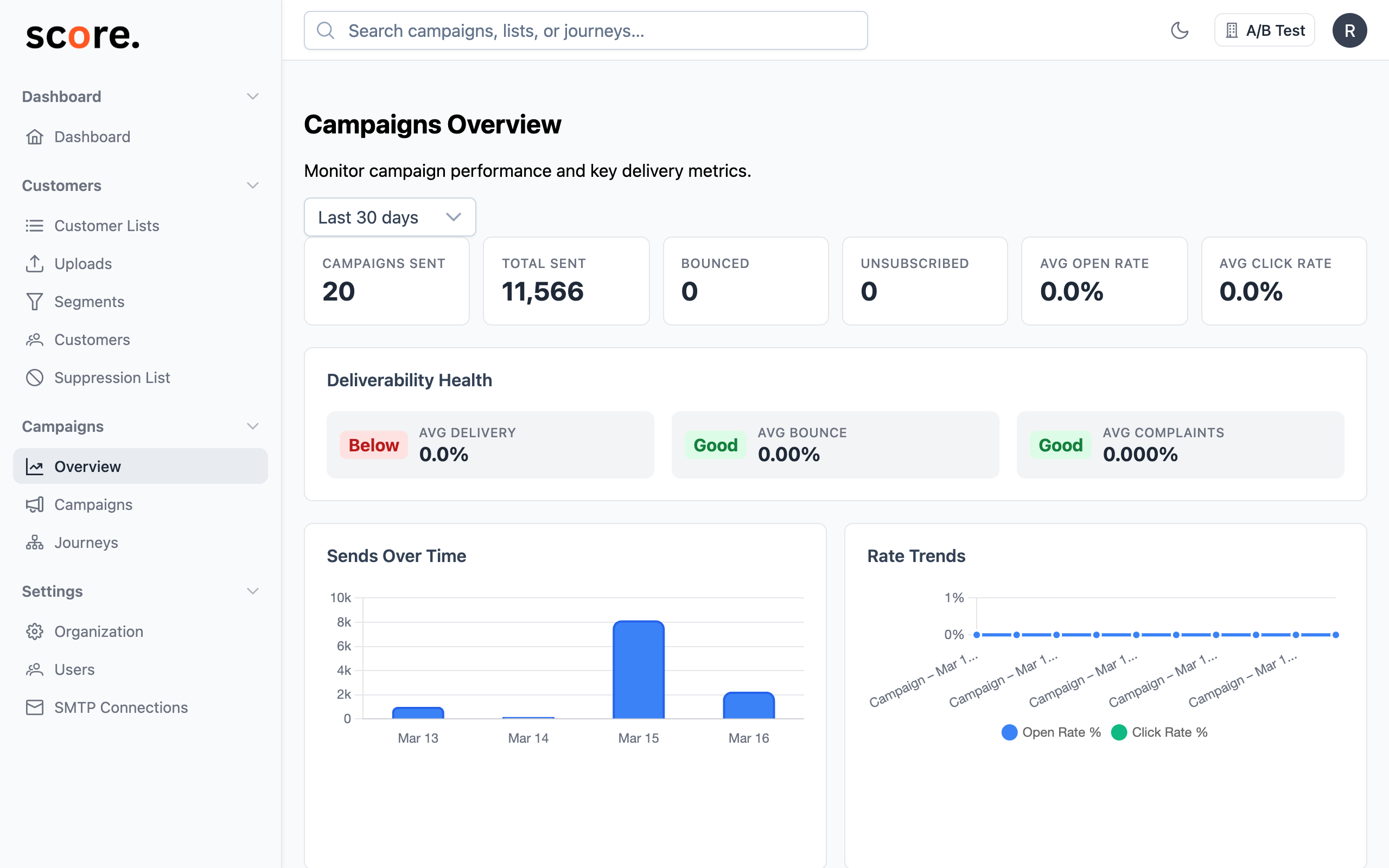
It features three tabs:
- Overview — high-level KPIs (campaigns sent, total sent, bounced, unsubscribed, open rate, click rate), deliverability health indicators, sends over time chart, rate trends, and recent campaigns
- ISP Analytics — see how each mailbox provider (Gmail, Microsoft, Yahoo, Apple) performs across all your campaigns. Filter by ISP and time period to spot deliverability trends before they become problems
- ESP Analytics — compare SMTP connection performance side by side. Filter by ESP to see which provider delivers best and track trends over time
All three tabs share the same period selector (Last 7 days, 30 days, 90 days, etc.) in the top-right corner. The ISP and ESP tabs each have their own filter dropdown that appears when the tab is active.
Next Steps
- Create and Send a Campaign — full walkthrough
- Write Your Email — content editor, merge tags, and personalization
- A/B Test Your Emails — find what resonates with your audience
- Understand Your Results — read your campaign reports
- ISP Analytics — monitor deliverability by mailbox provider
- ESP Analytics — compare email provider performance
- Delivery Settings — SMTP providers, throttling, and advanced routing